Tools
ECHO Missions Tool
Section titled “ECHO Missions Tool”A World Editor tool for routine work with groups, markers and spawns. It’s in the World Editor tool list. The buttons work on the selected entities.
| Button | What it does |
|---|---|
| Get callsign | Copies the callsign of the selected group into the tool’s Company / Platoon / Squad fields. Select exactly one group. |
| Assign callsigns | Gives the selected groups the callsign from the tool’s Company / Platoon / Squad fields and renames their entities. Adds SCR_CallsignGroupComponent if the group doesn’t have it. |
| Rename groups | Renames the entities of the selected groups after their current callsign. |
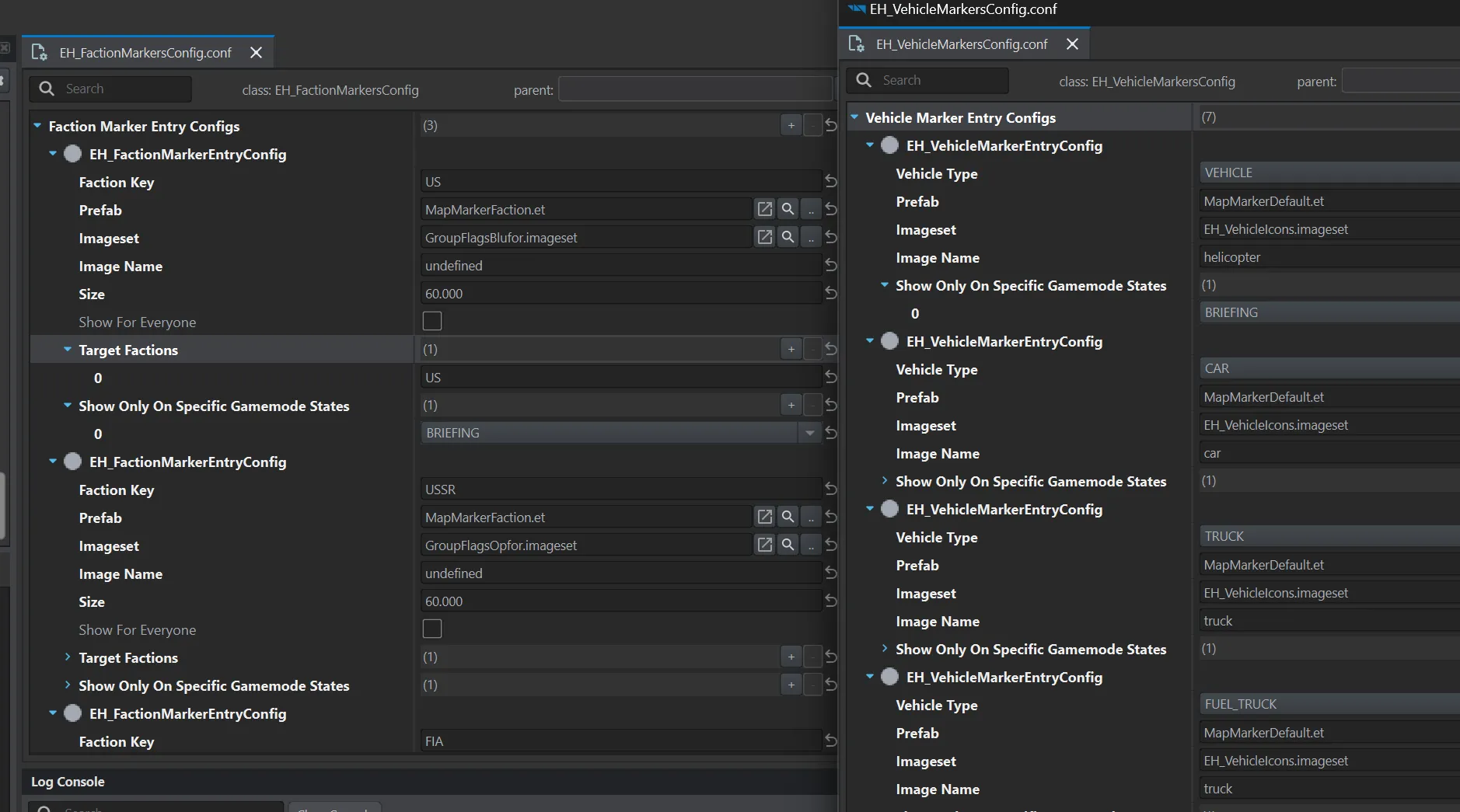
| Spawn Marker | Places markers for the selected groups and vehicles. Which marker to place is taken from the configs Configs/WorkbenchGame/EH_FactionMarkersConfig.conf and EH_VehicleMarkersConfig.conf — you can swap them for your own in the tool’s fields, Configs category. |
| Create Default Group Spawn | Creates a default spawn option for the selected groups at their current position. |
| Create New Group Spawn | Creates an extra spawn option where the camera is looking. |
More on spawns: Spawns.
Entity names
Section titled “Entity names”Assign callsigns and Rename groups name a group by the scheme FACTION_company_platoon_squad, for example US_1_2_3. If the name is taken, a number is added: US_1_2_3 (1). Spawn points are named the same way, extra options get a suffix: US_1_2_3_Spawn1.
These names are later used in the Entity Name fields of spawns and in the vehicles’ Assigned Group Entity Name — so it’s better to rename groups before creating spawns.
Custom marker configs
Section titled “Custom marker configs”Spawn Marker takes markers from two configs of the mod. There are two ways to adjust them:
- override them in your addon — the tool picks up your configs instead of the mod’s right away. Suits a marker set shared by all your missions, for example for RHS factions;
- duplicate them and adjust for a specific mission — then set the copies in the tool’s fields, Configs category.
Group markers — EH_FactionMarkersConfig, one entry per faction:
| Field | What it sets |
|---|---|
| Faction Key | the faction whose groups the entry is for |
| Prefab | marker prefab, usually MapMarkerFaction.et |
| Imageset, Image Name | image: the faction’s flag set and the name in it |
| Size | marker size |
| Show For Everyone, Target Factions, Show Only On Specific Gamemode States | who sees the marker and in which states |
Vehicle markers — EH_VehicleMarkersConfig, one entry per vehicle type:
| Field | What it sets |
|---|---|
| Vehicle Type | vehicle type; on the vehicle it’s set in the Vehicle Type field |
| Prefab | marker prefab, usually MapMarkerDefault.et |
| Imageset, Image Name | image, usually from EH_VehicleIcons.imageset |
| Show Only On Specific Gamemode States | in which states the marker is visible |
If there is no entry for the vehicle’s type, the entry for CAR is used.
ECHO Mission Validator
Section titled “ECHO Mission Validator”World Editor → Plugins → ECHO Mission Validator. Since 1.3.35.
Checks a mission for basic problems in TvT mode: factions, characters, general settings. The report goes to the log, problems are marked as WARN or ERROR. Run it before every mission release.
What it checks on characters and groups:
- binoculars — required for the squad leader, radio operator, sniper, spotter and ammo bearer roles;
- long range radio — required for the squad leader and the radio operator;
- radio encryption keys — all radios of a faction must have the same key as the first checked character;
- group callsign — warns if a custom callsign is set incorrectly;
- broken character —
ERRORif no data could be collected about the character at all.
The validator takes the role from the character’s editor icon (SCR_EditableCharacterComponent) — the standard Reforger role icon. If the character has the wrong icon, the checks for its role will be wrong.
ECHO Mods List Exporter
Section titled “ECHO Mods List Exporter”World Editor → Plugins → ECHO Mods List Exporter. Since 1.4.2.
Exports the list of mods enabled in the mission.
ECHO Loadout Editor
Section titled “ECHO Loadout Editor”The t-shirt button in the World Editor toolbar. Since 1.6.0. It edits the gear of a character prefab: clothing, weapons, gadgets and the contents of the pockets.
How to use it has a page of its own: A character’s gear.
Chat commands
Section titled “Chat commands”All commands are in Administration.