
Spawns
A group can have several start options. On the briefing the side commander picks an option for each squad on the map, and when the game starts the group moves there together with its vehicles and markers. The feature appeared in 1.4.2.
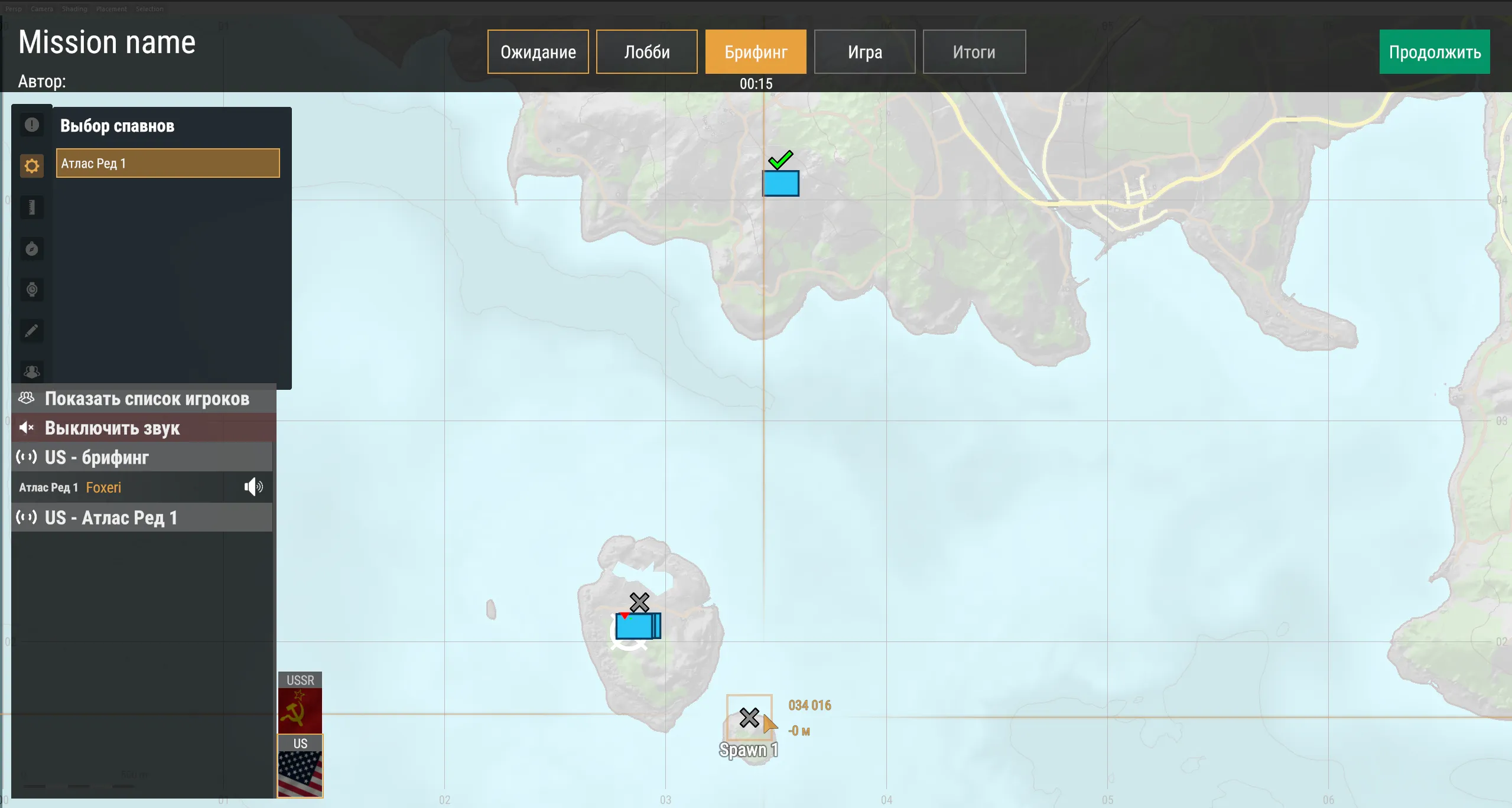
How it works
Section titled “How it works”- Group point — the
EH_GroupSpawnPointEntityentity (prefabPrefabs/Spawns/EH_GroupSpawnPoint.et), one for each start option. - Child points —
EH_SpawnPointEntityentities (prefabPrefabs/Spawns/EH_GroupAssignedEntitySpawnPoint.et) under the group point in the hierarchy. Each one sets where a specific vehicle or the group marker ends up when this option is chosen.
Child points are rarely placed by hand — ECHO Missions Tool creates them from the vehicles assigned to the group.
The quick way: ECHO Missions Tool
Section titled “The quick way: ECHO Missions Tool”- Assign vehicles to the group: put the group’s entity name into the vehicle’s Assigned Group Entity Name field. See Vehicles.
- Select one or more groups in World Editor.
- In ECHO Missions Tool press Create Default Group Spawn — a default option appears at the group’s current position.
- For an extra option, point the camera where the group should be and press Create New Group Spawn — the point goes where the camera looks.
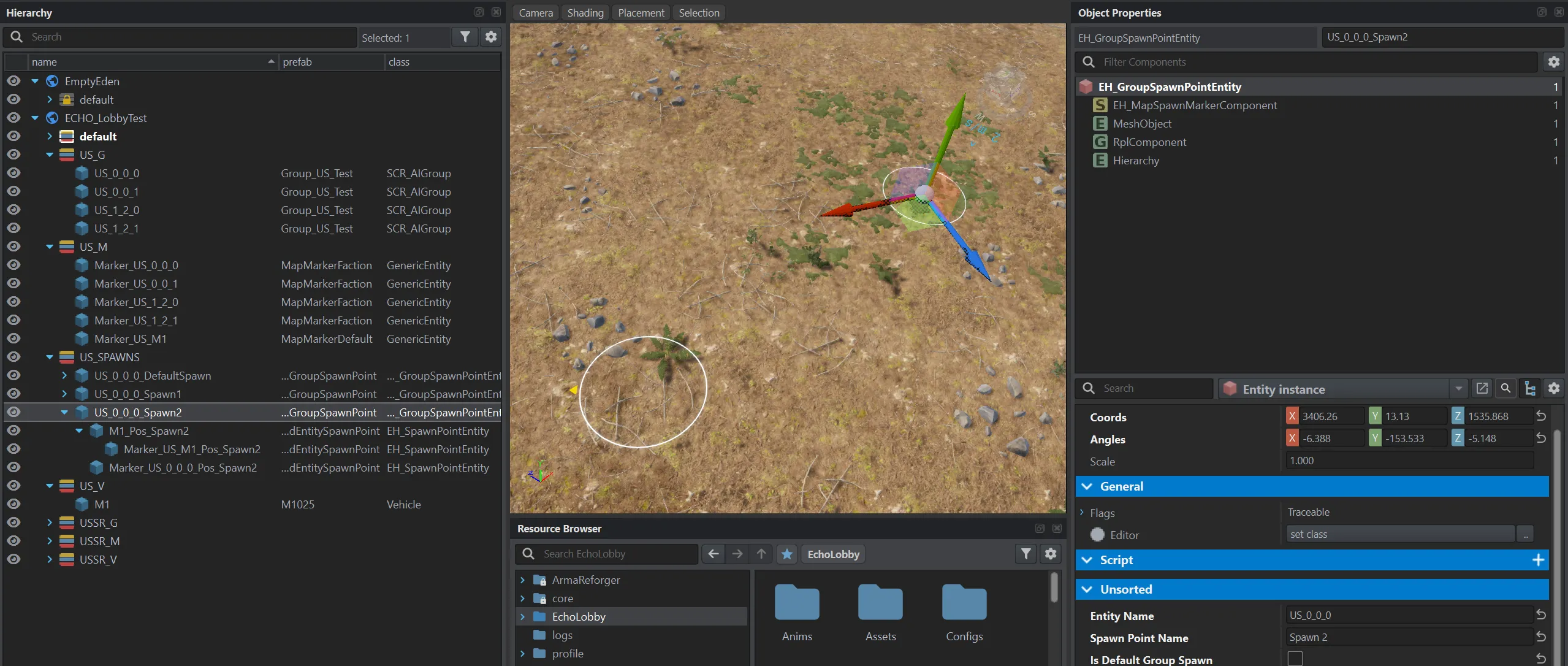
The tool creates the group point and under it — points for all assigned vehicles, for the group marker and for the markers of these vehicles, keeping their positions relative to the group. If the relative placement on a particular spawn needs to change, move or rotate either the spawn object itself (the group moves relative to it) or the vehicle’s child object. The markers inside the spawn don’t need to be moved — they are positioned relative to their parent automatically.
This is what the result looks like: the group has three start options, and under an option are the points of the vehicle, its marker and the group marker.
Group point attributes (EH_GroupSpawnPointEntity)
Section titled “Group point attributes (EH_GroupSpawnPointEntity)”| Field in the editor | Type | Default | What it does |
|---|---|---|---|
Entity Name (m_EntityName) |
text | empty | Entity name of the group (SCR_AIGroup) in the world — which group the point belongs to. |
Spawn Point Name (m_SpawnPointName) |
text | empty | Option name the commander sees on the map. The tool sets “Default spawn point”. |
Is Default Group Spawn (m_IsDefaultGroupSpawn) |
flag | off | This option is preselected until the commander changes it. |
Child point attributes (EH_SpawnPointEntity)
Section titled “Child point attributes (EH_SpawnPointEntity)”| Field in the editor | Type | Default | What it does |
|---|---|---|---|
Entity Name (m_EntityName) |
text | empty | Name of the entity in the world — a vehicle or a marker — that goes to this point. |
Position and rotation are taken from the point itself.
Typical setups
Section titled “Typical setups”One fixed start. No points needed — leave the group and its vehicles where they are in the editor.
A choice on the briefing with a default option. Create Default Group Spawn keeps the group’s current position as the default option.
A choice between several options. Create Default Group Spawn, then Create New Group Spawn for each extra place. Give the options clear Spawn Point Names — the commander sees them.
- Entity Name is the entity name in the world, not the lobby Group Name. If you renamed a group in World Editor, fix all its points.
- Assign vehicles first, then create spawns. The tool takes the vehicles assigned to the group at the moment you press the button. If you added a vehicle later, recreate the points or place a child point by hand.
- A child point without a group point parent doesn’t work. The server log shows the error
vehicle spawn point '...' has no group spawn point parent. - Is Default Group Spawn — on exactly one point of the group. If two have the flag, the one that registers last is selected.
See also
Section titled “See also”- Groups and slots — who the side commander is
- Vehicles
- Tools